TABZOOKA
Chrome extension games worth installing
Good Chrome extension games include Tabzooka, which turns the page you’re on into a platformer; BattleTabs, a Battleship-style game in your new tab; and Moonbounce, which adds other players and treasure hunts to the sites you browse. Before installing any of them, check what permissions the extension asks for.
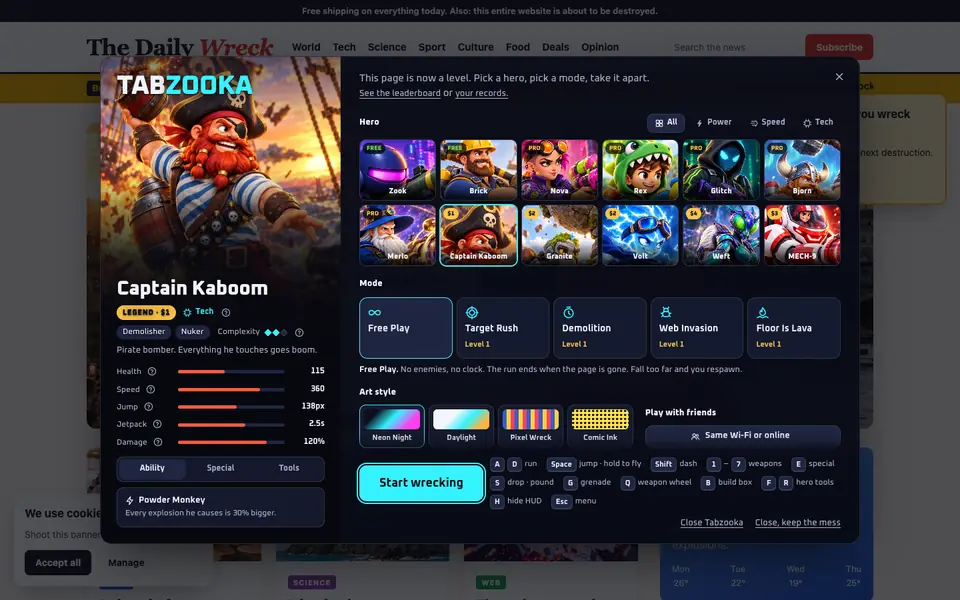
Tabzooka
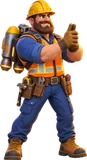
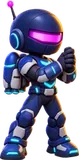
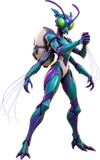
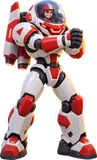
Tabzooka turns whatever website you have open into a level. A jetpack hero drops onto the page and its headlines, images and buttons become platforms and targets. There are 12 heroes, 84 weapons, 5 modes with bosses, and multiplayer for up to 6 people on the same page. Two heroes, two modes and same-Wi-Fi multiplayer are free. See the heroes.
BattleTabs
BattleTabs is Battleship where every ship has an ability. You build a fleet, battle friends or other players, and climb a leaderboard. It can take over your new tab page, which you can switch off in its settings, and it’s also on the web, mobile, Steam and Discord.
Moonbounce
Moonbounce is closer to a social layer than a single game. It shows you other people on the same website and turns browsing into a treasure hunt with rewards, so you can hang out with friends while you scroll.
A note on Kick Ass
Kick Ass, the classic that lets you shoot a web page apart with a little spaceship, is a bookmarklet rather than an extension, so you won’t find it in the Chrome Web Store. It still works the same way: drag its button to your bookmarks bar and click it on any site. We compared it with other website destroyers in this guide.
How to tell a safe game extension from a risky one
A game doesn’t need to read your data on every site. Before you install one, open its Chrome Web Store page and look at what it asks for:
- “Read and change all your data on all websites” means it can run everywhere, all the time. Some games need it, but it deserves a second look.
- activeTab means it can only touch the tab you choose, and only when you start it. That’s the safest option for a game that plays on web pages.
- Storage is just for saving your settings and progress.
Tabzooka uses only activeTab, scripting and storage, with no host permissions, and the page you play on never leaves your computer. The details are in its privacy policy.
What makes a good extension game
Extension games live in a strange spot: they’re always one click away, but you only ever play them in short bursts. The good ones lean into that. They start instantly, they work wherever you already are in the browser, and they’re easy to put down. BattleTabs fits a match into your new tab. Moonbounce rides along while you browse. Tabzooka plays on whatever page you have open, so the level changes every time you visit a new site.
A closer look at Tabzooka’s modes
| Mode | What you do | Free? |
|---|---|---|
| Free Play | No clock and no enemies. Level the whole page. | Free |
| Target Rush | Marked elements; destroy them before time runs out. | Free |
| Demolition | 60 seconds to hit a score. | Pro |
| Web Invasion | Waves of creatures, with a boss every third wave. | Pro |
| Floor Is Lava | Lava rises from the bottom of the page. Climb. | Pro |
Every mode except Free Play has levels that get harder, and each mode has its own global top-20 leaderboard. The game also has 4 art styles (Neon Night, Daylight, Pixel Wreck and Comic Ink) if you want the page to look different while you wreck it.
How to install, pin and remove an extension game
- Open the game’s page on the Chrome Web Store and click Add to Chrome. Chrome shows any permissions before it installs.
- Click the puzzle-piece icon next to the address bar and pin the game, so its icon stays one click away.
- To change a game’s keyboard shortcut, open chrome://extensions/shortcuts.
- To remove a game, right-click its icon and choose Remove from Chrome, or manage everything at chrome://extensions.
Why permissions matter more for games
Games tend to get installed on impulse, which is exactly when people skip the permission screen. A game that only uses activeTab shows no scary warning at all, because it can only act on a tab after you click it or press its shortcut. If a simple game asks to read and change data on every website, it’s fair to ask why.
It’s also worth checking the “Updated” date on the store listing. A game that hasn’t been updated in years may stop working as Chrome changes, while an active one usually gets fixes.
BattleTabs in more detail
BattleTabs is made by Gangbusters Ltd in the UK, and a lot of it is shaped by its players: the community submits ship ideas, edits the wiki and runs tournaments. Matches are short, which suits a new-tab game, and you can play the same account on the web, mobile, Steam and Discord, so a match started at your desk can carry on elsewhere.
Moonbounce in more detail
Moonbounce calls itself the multiplayer internet. With one click you can see and interact live with anyone else on the same website, collect rewards and hunt for treasure while you browse. It’s light by design, so it sits in the background until you want company. If you like the idea of other people being on the page with you, it pairs well with Tabzooka, where those people can be wrecking the page alongside you.
Picking the right one for you
| If you want… | Try |
|---|---|
| Action on the page you’re reading | Tabzooka |
| A quick strategy match in a new tab | BattleTabs |
| Company while you browse | Moonbounce |
| A one-click classic with no install | Kick Ass (bookmarklet) |
You don’t have to choose just one. Extension games don’t run until you open them, so having a few installed costs nothing while you’re not playing.
A 30-second safety checklist
- Read the permissions on the store listing before clicking Add to Chrome. Prefer games that only act on the tab you choose.
- Check the developer section of the listing for a website and a support email.
- Look at the update date. Recently updated games are more likely to work and to get fixes.
- Read a few recent reviews, especially the low-rated ones, for real problems rather than taste.
- Check the privacy policy for what leaves your computer. A game shouldn’t need your browsing history.
Where extension games fit
Extension games aren’t trying to replace a console or a big PC game. They’re for the five minutes between tasks, the lunch break, or the moment a page is taking too long to load. The best ones respect that: they start instantly, save your progress and get out of the way when you close them. If a game needs a long tutorial or a forced account before you can play, it’s probably not built for that moment.
Multiplayer is where they’re growing fastest. Because everyone already has Chrome, a friend can join in the time it takes to send them a link, with no separate download or launcher.
Questions people ask
Are Chrome extension games free?
Most have a free version. Tabzooka is free to play with 2 heroes, Free Play, Target Rush and same-Wi-Fi multiplayer; BattleTabs and Moonbounce are free to start too.
Can Chrome extension games see my browsing?
It depends on their permissions. An extension limited to activeTab can only touch the tab you start it on, when you start it. Check the permissions on the Chrome Web Store page before installing.
Do Chrome extension games work on a Chromebook?
Chrome extensions run in Chrome on Windows, Mac, Linux and ChromeOS. They don’t run on Chrome for iPhone or Android.