TABZOOKA
How to play Destroy Any Website, and what to wreck first
Destroy Any Website is a free browser game by Hugo Duprez, published by Sprite Fusion on 28 September 2026. You paste a web address into destroy.spritefusion.com and the page becomes a pixel-art level: a stickman runs, jumps and hovers across it while you shoot it apart until the destruction meter hits 100%. Only a copy gets wrecked, so the real site is fine.
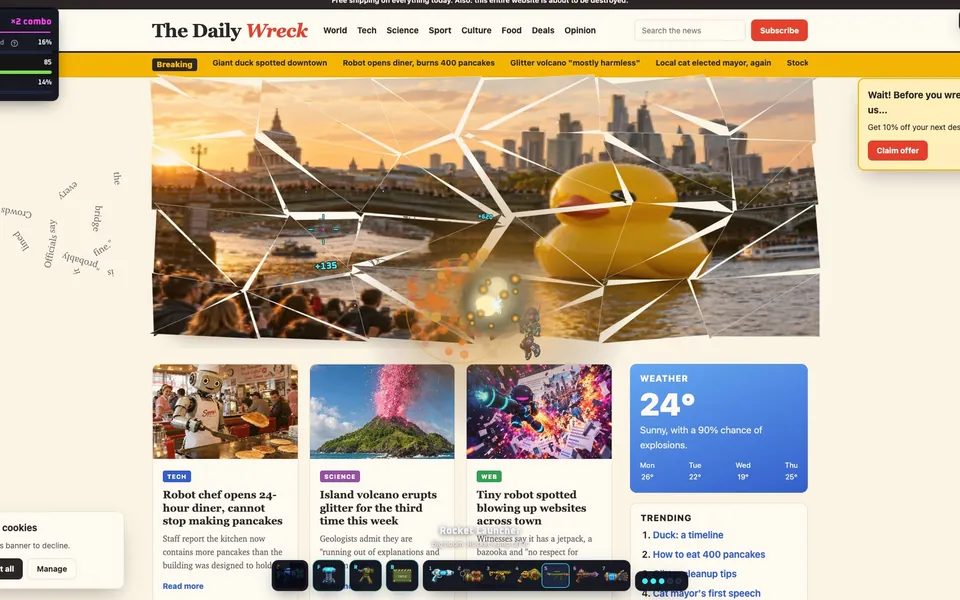
Why everyone is wrecking websites this week
Hugo Duprez, a France-based design engineer who runs the pixel-art tool Sprite Fusion, posted the game on 28 September. Within two days it was on Dexerto, TechSpot, Creative Bloq, VGTimes and OMG! Ubuntu, and Daring Fireball linked to it on the 29th. TechSpot called it “very addictive and satisfying, despite the simplicity”, which is about right.
The pitch fits in a screenshot. Everyone knows what Wikipedia or a news homepage looks like, so a clip of one falling apart explains itself before anyone reads the caption.
How to play, step by step
- Open destroy.spritefusion.com in a desktop browser. It doesn’t run on phones.
- Paste the address of the site you want to wreck, or pick the demo page or Wikipedia.
- Move with A and D (or the arrow keys), and jump with W or Space. Hold jump in the air to hover.
- Aim with the mouse and click to fire. Right-click throws a grenade.
- Keep going until the destruction meter reaches 100%.
You don’t need an account, there’s no tutorial, and the page loads in a few seconds, which is a big part of why it spread so fast.
The weapons
TechSpot’s launch-week review counted seven:
| Weapon | What it’s good for |
|---|---|
| Pistol | Precise shots at single letters and buttons |
| SMG | Shredding a paragraph quickly |
| Shotgun | Close-range chunks of a layout |
| Rocket | Big images and whole sections |
| Railgun | A straight line through everything in its path |
| Flamethrower | Slow, lingering damage with lots of smoke |
| “Too Much” | A parachute bomb that splits into smaller bomblets |
Sprite Fusion’s own page now also lists a neutron star gun, “The Magic Wand” and a drone-mounted gatling gun, so the arsenal has grown since launch.
Playing with friends
From the main page you can open a private room and send friends the invite link or its six-character room code, or jump into public quick play. Everyone loads the same website, and it becomes a race to the room’s target score, with a scoreboard. Rooms are small: the game’s code caps them at 5 players, and you can join as a guest.
The best sites to destroy
On Google Trends, the searches climbing fastest next to “destroy any website” over the past month are Wikipedia, Roblox and Minecraft, followed by “website destroyer” and “destroy any site”. Those picks make sense:
- Wikipedia is mostly text, so every shot knocks individual letters loose. It’s also one of the game’s built-in options, which makes it the easiest place to start.
- Roblox and Minecraft have image-heavy homepages, and big pictures break into satisfying chunks.
- News sites have huge headline photos, a cookie banner and a dozen boxes stacked on top of each other.
- Your own website or portfolio is oddly fun, and it shows you how the page is built.
- Any site that annoyed you this week. It won’t fix anything, but it helps.
When a site won’t load
Destroy Any Website works by loading its own copy of the address you give it. That has one catch: it sees the page the way a logged-out visitor would. Anything behind a login, like your inbox or a school portal, can’t be loaded, and some sites with strict bot protection refuse the request. If one fails, try the same site’s public homepage, or pick another site.
Want to wreck the page you already have open?
That’s the gap Tabzooka fills. It’s a Chrome extension, so instead of loading a copy, it runs on the tab in front of you. Press Alt+Shift+Z and a jetpack hero drops onto the page, including pages you’re logged into, because it’s your tab and nothing has to be fetched again. The page never leaves your computer, and closing the game puts everything back.
| Destroy Any Website | Tabzooka | |
|---|---|---|
| How you start | Paste a URL on its site | Alt+Shift+Z on any open tab |
| Install | None | Chrome extension |
| Pages behind a login | Can’t load them | Works on them |
| Style | Pixel-art stickman shooter | Jetpack platformer with 12 heroes |
| Goals | Destruction meter, score race | 5 modes, levels, 10 bosses, leaderboards |
| Multiplayer | Up to 5 in a room | Up to 6: co-op, brawl, 1v1, teams |
| Price | Free, optional skin pack | Free with 2 heroes; Pro adds more |
They’re different games built on the same joke, and they work well side by side. Destroy Any Website is the fastest way to wreck a site you don’t have open. Tabzooka is for the page you’re on, with heroes, boss waves and Floor Is Lava when sandbox wrecking gets old. You can watch it in the 18-second trailer or add it to Chrome. We also compared both with the 2010 classic Kick Ass in this guide.
Tips for a higher score
- Start at the top of the page. Debris falls, and you can stand on what’s left below.
- Use explosives on images and rapid fire on text. Letters are small, and splash damage wastes them.
- Hover to reach the parts of tall pages that have no ledges.
- In a multiplayer race, split the page with your friends instead of fighting over the same headline.
Questions people ask
Is Destroy Any Website free?
Yes. The game is free to play in a desktop browser. There is an optional paid Halloween Skin Pack, but every weapon and the multiplayer rooms work without it.
Who made Destroy Any Website?
Hugo Duprez, a France-based design engineer, made it and published it through his pixel-art tool Sprite Fusion on 28 September 2026.
Can you play Destroy Any Website on a phone?
No. It’s built for a desktop browser with a keyboard and mouse.
Is there a destroy-website game that works as a Chrome extension?
Yes. Tabzooka is a Chrome extension: open any normal website and press Alt+Shift+Z to turn that page into a level, with no URL to paste.
Does destroying a website hurt the real site?
No. Destroy Any Website wrecks a copy of the page, and Tabzooka only changes what your own tab shows. Nobody else sees anything, and the site’s server is never touched.