TABZOOKA
Games to play when you’re bored on a computer
The quickest games to play when you’re bored on a computer are already in your browser: Chrome’s dinosaur game at chrome://dino, Snake and Minesweeper on Google, Wordle and Connections, Infinite Craft and 2048. With friends, try skribbl.io or Gartic Phone. If you have Chrome, Tabzooka turns the page you’re on into a level.
Hidden games already in Chrome and Google
These need no sign-up and no install, and most load in a second.
- The Chrome dinosaur game appears whenever you lose your connection, but you can play it any time by typing chrome://dino into the address bar. Press Space to jump the cacti.
- Google Snake is the classic snake game, with settings for speed, board size and game mode. Search “play snake” to find it again.
- Google Minesweeper opens the same way. Search “minesweeper”.
- The Pac-Man Google Doodle from 2010 is still playable, maze, ghosts and all.
Daily puzzles that take two minutes
- Wordle: guess the five-letter word in six tries. One puzzle a day, free.
- Connections: sort 16 words into four hidden groups. Harder than it looks.
- Infinite Craft: start with water, fire, wind and earth and combine them into anything at all. It has a daily challenge too.
- Little Alchemy 2: the same idea with a fixed set of things to discover, if you like a checklist.
- 2048: slide tiles to merge matching numbers. Easy to start, hard to put down.
The rest of neal.fun is worth a look as well. The Password Game, Perfect Circle and Spend Bill Gates’ Money are all good for ten minutes.
Quick games to play with friends
- skribbl.io: one person draws, everyone else guesses. Make a private room and share the link.
- Gartic Phone: the telephone game with drawings. Everyone writes a prompt, draws someone else’s, and the results get stranger each round.
- Slither.io: a giant online snake game against strangers.
- Bloxd.io: blocky multiplayer games that run in the browser.
We wrote a longer list of browser games to play with friends, with how many people each one holds.
Games that wreck the page you’re on
This is the strangest category, and the most fun when you’re bored of a website rather than bored in general.
- Kick Ass is a bookmarklet from 2010: click it on any site and fly a little ship around, shooting the page apart.
- Destroy Any Website went viral in September 2026. Paste an address and wreck it with a pixel stickman.
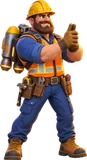
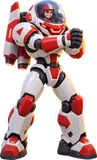
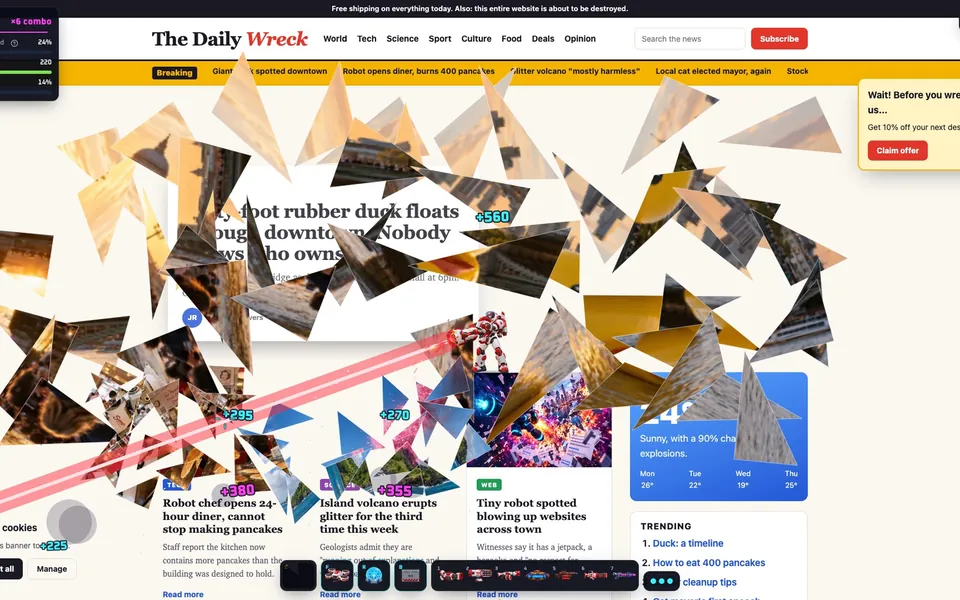
- Tabzooka is our Chrome extension. Press Alt+Shift+Z and a jetpack hero lands on whatever page you have open, so the level changes every time you visit a new site.
The whole list at a glance
| Game | Solo or friends | Install | Good for |
|---|---|---|---|
| Chrome dinosaur | Solo | Built into Chrome | 30 seconds |
| Google Snake | Solo | None | 5 minutes |
| Wordle, Connections | Solo | None | One puzzle a day |
| Infinite Craft | Solo | None | As long as you like |
| 2048 | Solo | None | 10 minutes |
| skribbl.io, Gartic Phone | Friends | None | A group in one room or on a call |
| Slither.io, Bloxd.io | Online strangers | None | Quick action |
| Kick Ass | Solo | Bookmarklet | Wrecking any page |
| Destroy Any Website | Solo or friends | None | Wrecking a site by URL |
| Tabzooka | Solo or up to 6 | Chrome extension | Wrecking the page you’re on |
Bored at school?
On Google Trends, “games to play when bored at school” is the fastest-rising version of this search over the past month, so here’s what actually works on a school computer.
Most schools run Chromebooks that the school manages, and the administrator decides what’s allowed. On those devices the Chrome dinosaur game is often switched off, installing extensions is usually blocked, and many game sites are filtered. What’s left tends to be the puzzle games, like Wordle and Connections, because they sit on news sites rather than game sites.
The better plan is to save games for lunch and breaks, and for a computer at home. The games on this list all run on a home Chromebook, Windows PC, Mac or Linux machine. And if you and your friends play Tabzooka on the same Wi-Fi at home, one person hosts and everyone else just clicks Join, with no codes and no accounts. That part is free.
Bored at work?
The same rule applies: work computers often block extensions and game sites. A daily puzzle fits in a coffee break, and a two-minute round of something loud fits between meetings. If you can install extensions, Tabzooka is built for short breaks: it starts in a second on whatever page you’re looking at, and closing it puts the page back exactly as it was.
Five Tabzooka things to try in your first ten minutes
- Open a news site, press Alt+Shift+Z and shoot the biggest photo. It cracks, then shatters.
- Press B a few times to build a crate tower, then knock out the bottom crate.
- Destroy about 14 things to fill your Special, then press E over the busiest part of the page.
- Switch to Target Rush and clear the marked elements before the clock runs out.
- Open the Glass Museum arena from the toolbar icon and break every painting.
Two heroes and two modes are free. You can add Tabzooka to Chrome, or watch the 18-second trailer first.
Questions people ask
What can I play on a computer when I’m bored without downloading anything?
Chrome’s dinosaur game (type chrome://dino), Google Snake and Minesweeper, Wordle, Connections, Infinite Craft, 2048, skribbl.io and Destroy Any Website all run in a browser tab with nothing to install.
How do I play the Chrome dinosaur game without turning off the internet?
Type chrome://dino into Chrome’s address bar and press Enter, then press Space to start. On school or work Chromebooks the game can be switched off by the administrator.
What games can I play with friends when I’m bored?
skribbl.io and Gartic Phone are quick to set up: one person makes a private room and shares the link. Tabzooka supports up to 6 players on the same page, free when you’re all on the same Wi-Fi.
Is there a game that uses the website I’m on as the level?
Yes. Tabzooka is a Chrome extension that turns the page you have open into a platformer level. Kick Ass does something similar with a small spaceship.